
Plugin Tips
How to Add Voice Commands to WordPress

Plenty of AI tools have voice modes that let you seamlessly interact with them. Adding voice commands to your own site is also worth exploring. To do this, you are going to need to know a bit of PHP and JavaScript. For starters, you need to add the following code to your functions.php file.
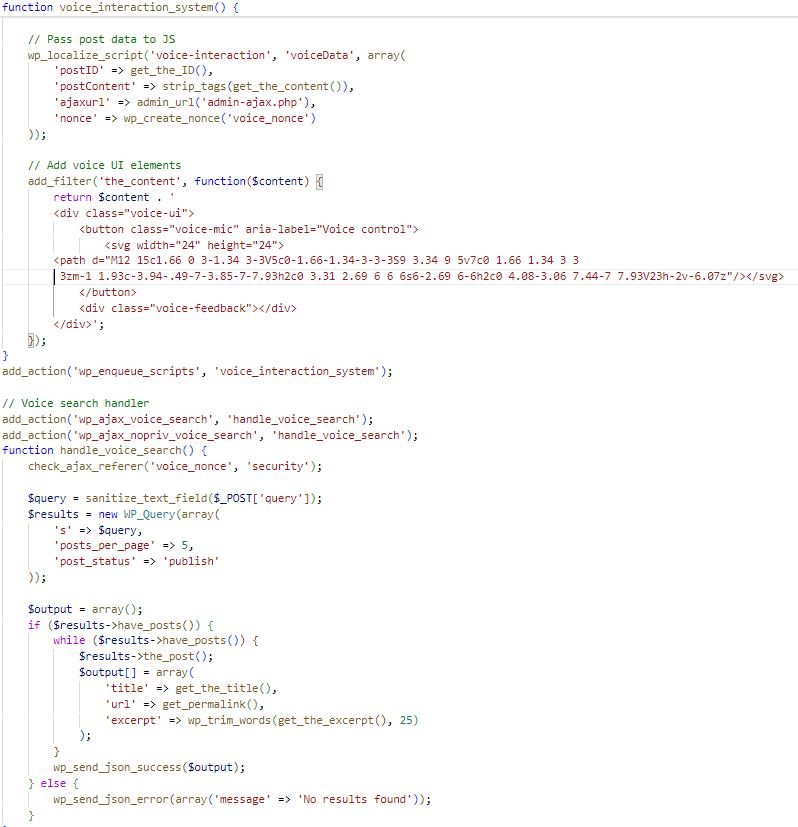
There is also a JS element to this. Once implemented, your site will be able to respond to natural language commands. Your visitors can also use basic voice commands for site navigation. This plugin relies on real-time speech to text conversion. It works with most browsers with Web Speed API.
class VoiceInterface {

constructor() {

this.micButton = document.querySelector('.voice-mic');

this.feedback = document.querySelector('.voice-feedback');

this.commands = {

'scroll (up|down)': this.handleScroll,

'search for *term': this.handleSearch,

'define *word': this.handleDefinition,

'read (this|aloud)': this.handleReadAloud

};

this.init();

}
init() {
const SpeechRecognition = window.SpeechRecognition || window.webkitSpeechRecognition;
this.recognition = new SpeechRecognition();
this.recognition.interimResults = true;
this.recognition.lang = ‘en-US’;
this.micButton.addEventListener(‘click’, () => this.toggleMic());
this.recognition.addEventListener(‘result’, (e) => this.processSpeech(e));
}
toggleMic() {
if (this.micButton.classList.contains(‘listening’)) {
this.recognition.stop();
this.micButton.classList.remove(‘listening’);
} else {
this.recognition.start();
this.micButton.classList.add(‘listening’);
}
}
processSpeech(e) {
const transcript = Array.from(e.results)
.map(result => result[0])
.map(result => result.transcript)
.join(”);
if (e.results[0].isFinal) {
this.executeCommand(transcript);
}
}
executeCommand(transcript) {
for (const [pattern, handler] of Object.entries(this.commands)) {
const regex = new RegExp(pattern.replace(/\*/g, ‘(.*?)’), ‘i’);
const match = transcript.match(regex);
if (match) {
handler.call(this, match);
return;
}
}
this.showFeedback(“Sorry, I didn’t understand that command”);
}
handleScroll([direction]) {
window.scrollBy(0, direction === ‘up’ ? -500 : 500);
this.showFeedback(`Scrolling ${direction}`);
}
handleSearch(term) {
fetch(voiceData.ajaxurl, {
method: ‘POST’,
body: new URLSearchParams({
action: ‘voice_search’,
query: term,
security: voiceData.nonce
})
})
.then(response => response.json())
.then(data => {
if (data.success) {
// Display search results as modal
this.displayResults(data.data);
} else {
this.showFeedback(“No results found”);
}
});
}
handleDefinition(word) {
const definition = this.defineWord(word);
this.showFeedback(definition);
}
handleReadAloud() {
const utterance = new SpeechSynthesisUtterance(voiceData.postContent);
speechSynthesis.speak(utterance);
}
}
new VoiceInterface();
This script relies on SpeechRecognition, SpeechSynthesis, WebAudio, Ajax to pull this off. Voice processing is done on the client side. Visitors will simply have to activate on a microphone icon to use this.